
Oral Presentation
All oral papers will be presented in one of the 12 oral sessions. The specific session assignment can be found on the Long, Regular, and ToH Papers Program .
Presentation durations are as follows:
| Paper Type | Presentation Time |
|---|---|
| Long Papers | 10-minute talk + 3-minute Q&A (total 13 minutes) |
| Regular Papers and ToH Papers | 9-minute talk + 2-minute Q&A (total 11 minutes) |
Please prepare your presentation according to the paper category.
Presenters may choose one of the following options for delivering their talk:
- 1. Use your own laptop: HDMI connections will be available. If your laptop requires a different type of connection, please bring the appropriate adapter. We strongly recommend testing your laptop with the conference projection system during a break before the session to ensure everything functions smoothly.
- 2. Use the conference-provided laptop: A Windows 11 laptop with PowerPoint will be available. Please transfer your presentation file to this laptop during a break prior to the session. After transferring, please be sure to check potential compatibility issues such as missing fonts or video playback errors.
•
An on-site technician will be available to assist with any technical issues.
•
We ask that all presenters arrive for their session at least ten minutes before it begins, check in with the session chairs, and sit near the front of the room to facilitate the change between speakers.
Poster Presentation (Regular and ToH Papers)
Poster session for the regular papers and ToH papers has been scheduled on Wednesday, July 9. The session will begin with a poster teaser session at 6:30 PM in the convention hall 1, followed by the main poster session in the lobby (3F).
During the teaser session, a presenter will deliver a 1-minute talk about your work. Further instructions about the teaser session will be shared soon.
•
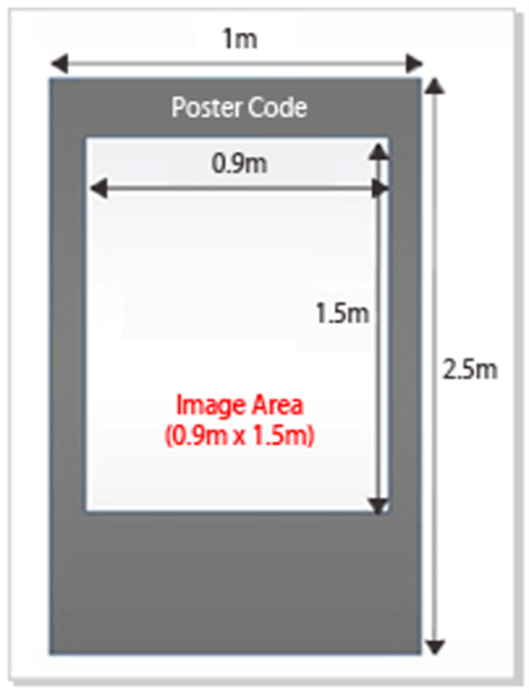
Presenters are responsible for the design and printing of their poster. Your poster will be displayed on a 1 m (width) × 2.5 m (height) board in portrait orientation. Please do not use landscape orientation, as it will not fit the board properly. We recommend printing your poster in A0 portrait format for optimal visibility. A sign with your poster number will be placed on the board.
•
Presenters are encouraged to include the conference logo found in here.
•
One-sided tape will be provided for mounting your poster. You may hang your poster during a break, lunchtime, or at the beginning of the session. Please note that posters are presented for one day only, so we kindly ask you to remove your poster at the end of your session.
•
Presenters are expected to stand by their posters during the session. If you need to step away temporarily, please place a visible note on your board.
Poster Presentation (WIP Papers)
All Work-In-Progress papers will be presented in one of the two WIP Poster sessions (July 9 Wednesday and July 10 Thursday). Both sessions will begin at 15:00 and last until 17:30. All the poster presentation will be held at the lobby (3F).
•
Presenters are responsible for the design and printing of their poster. Your poster will be displayed on a 1 m (width) × 2.5 m (height) board in portrait orientation. Please do not use landscape orientation, as it will not fit the board properly. We recommend printing your poster in A0 portrait format for optimal visibility. A sign with your poster number will be placed on the board.
•
Presenters are encouraged to include the conference logo found in here.
•
One-sided tape will be provided for mounting your poster. You may hang your poster during a break, lunchtime, or at the beginning of the session. Please note that posters are presented for one day only, so we kindly ask you to remove your poster at the end of your session.
•
Presenters are expected to stand by their posters during the session. If you need to step away temporarily, please place a visible note on your board.
Student Innovation Challenge (SIC)
SIC Presentation Guidelines
– Each team will be allotted a total of 8 minutes for their presentation, including the Q&A session with the judges. Please adhere strictly to this time limit.
- – Please arrive at least 10 minutes before the start of your presentation.
- – Lunch boxes will be provided for all participating team members.
– Presenters may choose one of the following options:
- 1.Use your own laptop: HDMI connections will be available. If your laptop requires a different type of connection, please bring the appropriate adapter. We strongly recommend testing your laptop with the conference projection system during a break before the session to ensure everything functions smoothly.
- 2.Use a conference-provided laptop: A Windows 11 laptop with PowerPoint will be available. Please transfer your presentation file during a break prior to the session. After transferring, please check for issues such as missing fonts or video playback errors.
– An on-site technician will be available to assist with any technical issues.
– Presenters are expected to stand by their posters during the session. If you need to step away temporarily, please place a visible note on your board.
SIC Demonstration Guidelines
– The Student Innovation Challenge includes a live demonstration component, where each team will showcase their projects to both judges and attendees over two days. Please carefully review the demonstration logistics and guidelines below.
- – All SIC teams are required to participate in the demonstration sessions on both July 9 and July 10, from 15:00 to 17:30.
- – Judges will evaluate teams presenting under the Mixed Reality theme on July 9, and the Future Mobility theme on July 10.
- – Attendees will also vote for the demonstrations, and these votes will contribute to the final evaluation.
- – Each team will be provided with a table (W1800 × D550 × H720 mm) and a back panel (W1000 × H2500 mm).
- – Basic utilities including 220V AC power (~500W) and a shared Wi-Fi network will be available.
- – Teams are responsible for designing and printing their own posters. Posters must be displayed in portrait orientation on the provided back panel — landscape posters will not fit properly.
- – We recommend printing your poster in A0 portrait format for optimal visibility.
- – One-sided tape will be available for mounting. Posters may be hung during designated break times.
- – Presenters are expected to stand by their posters during the session. If you need to step away temporarily, please place a visible note on your board.